
On-Page SEO: The Complete Guide to Optimizing Web Pages
You can write a genuinely helpful page and still watch it go nowhere. Sometimes Google never indexed it. Sometimes it ranks, but the title in the search result gives nobody a reason to click. Sometimes people arrive, scan the first screen, and leave because the page doesn’t answer the question that brought them there. Each of these is a page-level problem, and each needs a different fix.
On-page SEO is the work of making a single page easy for search engines to understand, easy for searchers to choose, and satisfying to read once they arrive. This guide is for beginners who want a clear map, for intermediate practitioners who want a repeatable method, and for advanced readers who want to separate documented behavior from folklore. It follows what a page actually goes through, from being found to being understood, chosen and finally read, so you always know why a change matters and what to fix first.
Quick answer
On-page SEO is the practice of improving the content, HTML elements and structure of one web page so search engines can understand it and people choose it and find it useful. Start with the page’s search intent, then work through its title, headings, main content, links, images and markup. Nothing here guarantees a ranking, because no one can promise one.
Key takeaways
- Decide each page’s job before you optimize it: one page, one job, one owner for each target keyword.
- Google documents no keyword density, ideal word count or required number of H1s. Write for the reader, and treat those figures as conventions.
- Titles, meta descriptions and headings do different jobs: earn the click, support the snippet and organize the page.
- Audit in order: found, understood, chosen, satisfied. Then fix the highest-priority issue first.
- Measure with Google Search Console and Google Analytics, wait a few weeks, and change one major thing at a time.
How this guide was made
Written for SEORAF by Mousume Akter, Founder & Editor. Last updated: November 26, 2026. Drafted with AI assistance. Google statements are drawn from Google Search Central documentation. Where a point could only be confirmed through secondary reports, it is labeled not independently verified. Examples marked illustrative are teaching examples, not real results, client work or product tests. SEORAF does not sell search rankings. It also offers an SEO audit service; see the editorial policy and affiliate disclosure.
How to read the evidence labels
To keep fact and opinion apart, this guide uses five labels. They appear in bold at the start of a statement, or in a “Basis” column in tables.
| Label | Meaning |
|---|---|
| Google-documented | Stated on Google’s own documentation pages |
| Published research | Findings from a study that was opened and read. This guide does not currently cite any. |
| Practitioner observation | Common industry advice or convention that Google does not document as a rule |
| SEORAF recommendation | A method or judgment offered in this guide, built on the documented behavior |
| Not independently verified | A claim that rests on secondary reports and should be checked before you rely on it |
If you’re new to SEO, read the guide in order. If you already know the basics, jump to the audit, the checklist or the FAQs.
What Is On-Page SEO?
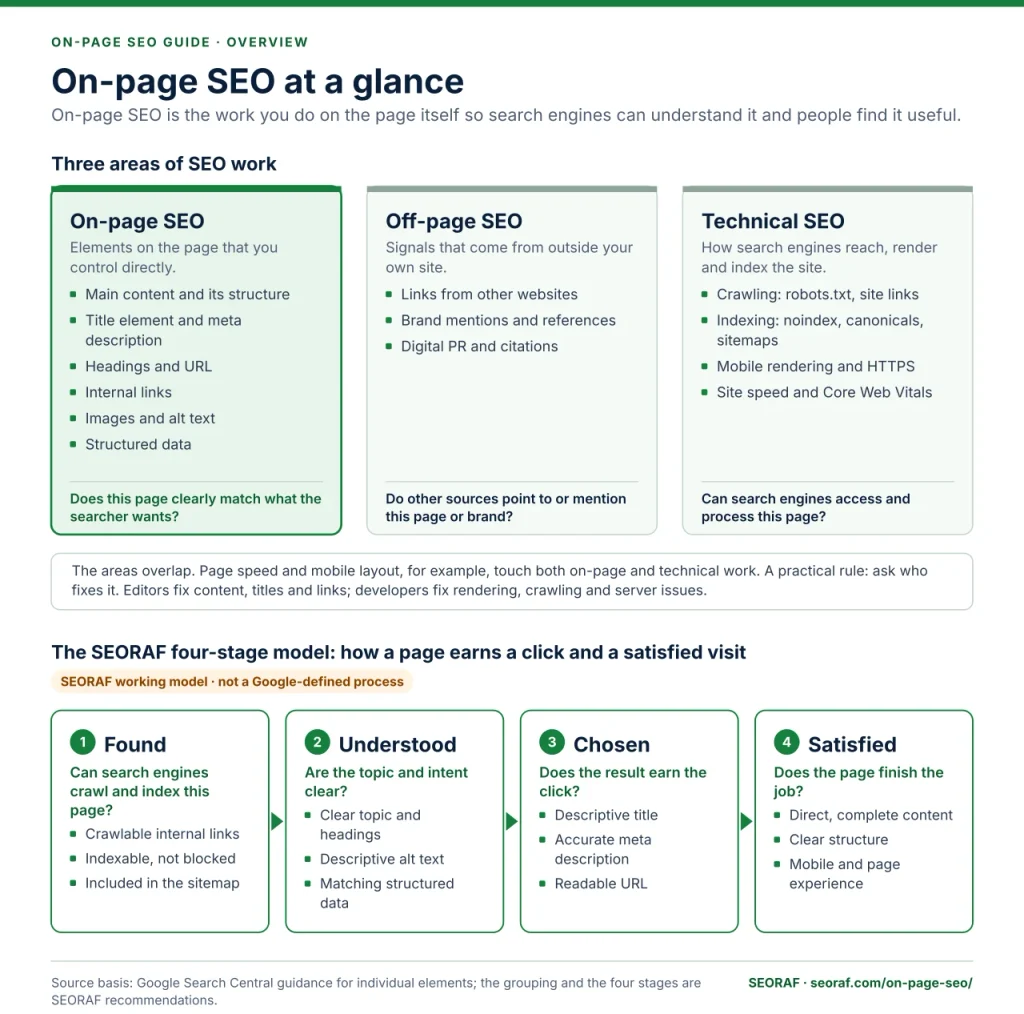
On-page SEO is the practice of improving the content, HTML elements and structure of an individual web page so that search engines can understand it and people choose it and find it useful. You will also see it called on-site SEO or page-level SEO, and the terms are used interchangeably.
Google frames SEO in a way that fits this definition. SEO is about helping search engines understand your content and helping users decide whether to visit your site. On-page SEO is the part of that job you do directly on the page.
What counts as on-page
Anything you can edit on the page itself, or in the template and CMS fields that control it, belongs here:
- Content: the main text, answers, examples, images, video and any tools on the page.
- Search-facing HTML: the title element, meta description, heading elements, image alt text and structured data.
- Connections: internal links, anchor text and links out to other sites.
- Experience: layout, readability, how the page displays on mobile, and the page weight that affects loading.
How it differs from SEO in general
SEO as a whole includes everything that helps a site be found and trusted: how it is built, how it is linked to and how its pages are written. On-page SEO is the page-level slice of that work. If you are new to the wider field, SEORAF’s SEO for beginners and SEO basics pages cover the full picture.
What it can’t do
On-page SEO makes a page eligible to compete and easier to choose. It cannot guarantee a result. Google states that it doesn’t guarantee it will crawl, index or serve any page, doesn’t accept payment to crawl a site more often or rank it higher, and that no secret trick will automatically put a site first. Changes also take time. Google says some changes take effect within hours while others take months, and suggests waiting a few weeks before judging whether your work helped.
Why Is On-Page SEO Important?
It is the part you control. You can’t make other sites link to you, and you can’t change how Google’s systems work. You can change what is on your own pages today.
It supports search engine understanding. Google can only work with what it finds on the page. When it indexes a page, it analyzes the text and key tags and attributes such as title elements and alt attributes, along with images and videos. If your best insight sits in an image with no description, or your title says nothing about the page, you’ve made Google’s job harder.
It improves content relevance. A page that states its topic clearly, covers the questions behind the query and uses the words readers use is easier to match to a search. That is relevance in practice: the page’s content lines up with what the searcher wants.
It shapes the search result. Searchers decide which result to open from a title link and a snippet. Both come largely from your page. A strong page with a vague title can lose the click to a weaker page with a clearer one.
It is user experience. Headings, short paragraphs, descriptive links and a first screen that delivers its promise help people use the page. Many on-page SEO best practices are simply good editing.
It aids discoverability, including in AI features. Google’s guidance says that optimizing for generative AI search is optimizing for the search experience, and thus still SEO. To appear in those features, a page must be indexed and eligible to be shown with a snippet, which is on-page and technical groundwork.
It has limits. On-page work won’t rescue a page with nothing original to say, and it won’t beat a far stronger competitor on its own. What it does is remove the avoidable reasons a good page underperforms.
On-Page SEO vs Off-Page SEO vs Technical SEO
These three terms overlap, and sources don’t always agree on the boundaries. Some treat technical SEO as a subset of on-page. This guide separates them because separating them helps you decide what to fix first.
| On-page SEO | Off-page SEO | Technical SEO | |
|---|---|---|---|
| What it is | Improving the content and elements of a page | Signals created outside your site | Making the site accessible, renderable and indexable |
| Where the work happens | On the page, in the template or CMS fields | Elsewhere on the web | Server, code, site-wide settings |
| Typical examples | Title, headings, copy, alt text, internal links | Links from other sites, brand mentions | robots.txt, sitemaps, redirects, rendering, canonical setup |
| Main question | Does this page match what searchers want, and is it clear? | Do others reference this page or site? | Can Google reach and process this page at all? |
| Your control | High | Limited | High, but often needs developer help |
Table 1. The three areas compared (basis: SEORAF recommendation, with definitions common across the industry)
A simple boundary rule (SEORAF recommendation). If a change affects what a visitor sees on the page, or the page’s own head elements and links, it is on-page. If it affects whether or how Google can access, render or process the site, it is technical. If the signal is created somewhere else, it is off-page.
Where the lines blur
Several things straddle the boundary, so decide who owns each one:
- Internal links are placed on the page but depend on site structure.
- Structured data is written into a page but validated like code.
- Page speed is influenced by on-page choices such as image size and embeds, and by hosting and code.
- Mobile display depends on the page’s layout and the site’s templates.
Which one first?
SEORAF recommends this order: access, then meaning, then reputation. If a page isn’t indexed, no title rewrite will help, so fix access (technical) first. If it’s indexed but doesn’t match what searchers want, work on meaning (on-page). If the page is strong and still hard to find in a crowded space, reputation (off-page) becomes the lever. Google notes that links are how it finds the vast majority of new pages, and that PageRank is only one of many ranking signals, so off-page work matters but is never the whole picture.
For the other two areas, see SEORAF’s technical SEO guide and link building guide.
How Search Engines Understand and Process Web Pages
To optimize a page well, it helps to know what Google does with it. Three things are easy to confuse: crawling is finding and fetching a page, indexing is analyzing and storing it, and ranking is choosing which indexed pages to show for a query.
Crawl, render, index, serve
Google’s documentation describes three stages, and not every page makes it through all three.
- Crawling. Automated programs called crawlers find pages and download their text, images and videos. Pages are discovered mostly by following links, and also from sitemaps.
- Rendering and indexing. During the crawl, Google renders the page, running the JavaScript it finds with a recent version of Chrome, much as a browser would. It then analyzes the text, images and key tags such as title elements and alt attributes, decides whether the page duplicates another, and picks a canonical version. Common indexing problems include low-quality content, robots rules that disallow indexing, and designs that make indexing difficult.
- Serving and ranking. When someone searches, Google returns the pages it believes are the most relevant and highest in quality for that query. Results can also vary with factors such as the searcher’s location and device.
What this means for your page
Google works from what it can see in the rendered page. Important text locked inside images, content blocked from Google, or elements injected by script that Google can’t process can all weaken how well a page is understood. You can check how Google sees a page with the URL Inspection tool in Search Console. SEORAF’s guides to crawling and indexing go deeper on the first two stages.
The four questions every page must answer
Google’s stages describe what happens inside the search engine. A page also has to win a human decision at the end. To connect the two, this guide uses a four-stage model: Found, Understood, Chosen, Satisfied. It is SEORAF’s own synthesis, not a Google framework.
| Stage | The question | On-page levers | Typical symptom when it fails |
|---|---|---|---|
| Found | Can Google reach and index this page? | Crawlable links, indexable content, correct robots rules | Page missing from the index |
| Understood | Does Google know what the page is about and who it’s for? | Intent match, clear topic, headings, alt text, natural keyword use | Indexed but ranks for the wrong queries, or barely at all |
| Chosen | Does the result earn the click? | Title, meta description, snippet-ready opening copy | Plenty of impressions, few clicks |
| Satisfied | Does the visitor get what they came for? | Main content, structure, readability, page experience | Clicks, but visitors leave unhelped |
Table 2. The Found, Understood, Chosen, Satisfied model (basis: SEORAF recommendation)
Every section that follows serves one or more of these stages. Searcher intent and keyword mapping serve Understood. Titles and meta descriptions serve Chosen. Headings serve Understood and Satisfied.
Search Intent and Keyword Research
Search intent is the reason behind a query: what the person is trying to find out, do, compare or buy. It sits before every tag and every keyword, because a page that answers the wrong question can’t succeed however well it is optimized. Search intent optimization simply means making the page’s job match that reason.
Google’s own guidance reflects this. It tells site owners to think about the words searchers use and notes that people with different levels of knowledge search differently, for example “charcuterie” versus “cheese board.” It also says its language systems can understand how a page relates to many queries, even without exact terms.
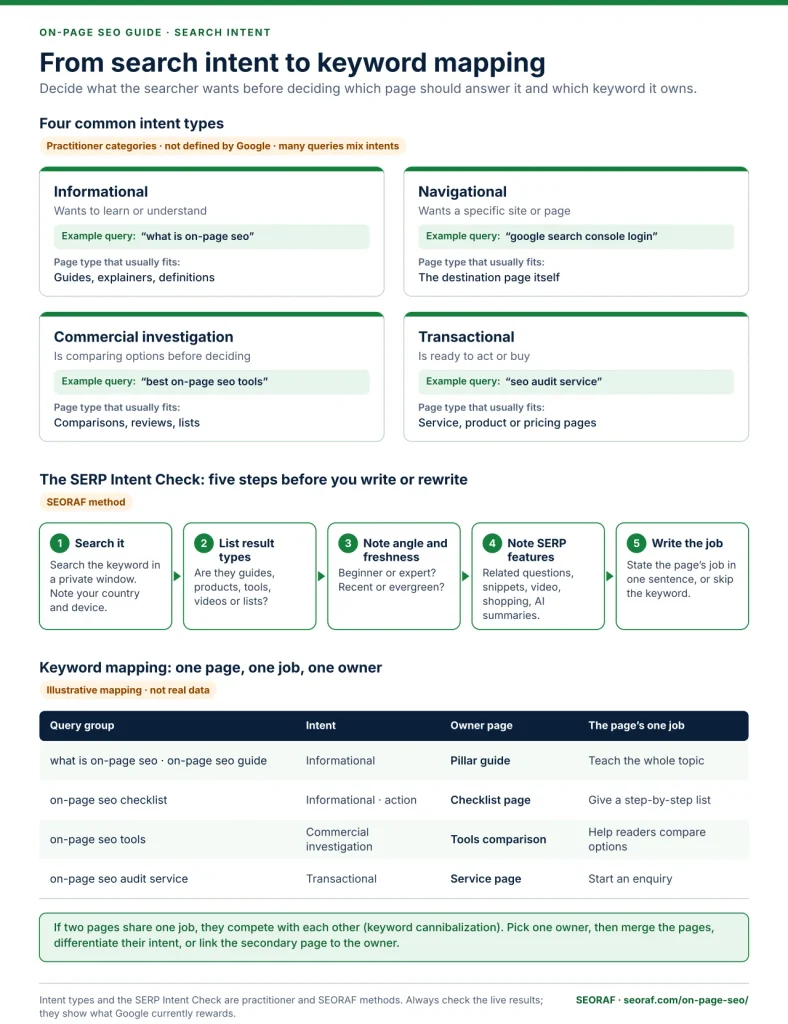
The four common intent types
The four-way split below is a practitioner observation, not a Google classification. It is still a useful working tool, and many queries mix intents.
| Intent | What the searcher wants | Example queries (illustrative) | Page that usually fits |
|---|---|---|---|
| Informational | To learn or understand | “how does a French press work” | Guide, explainer, tutorial |
| Navigational | To reach a specific site or page | “[brand] login” | The brand’s own page |
| Commercial investigation | To compare before deciding | “best standing desk for small spaces” | Comparison, review, roundup |
| Transactional | To act or buy | “buy standing desk” | Product, pricing or sign-up page |
Table 3. Intent types and what they expect (basis: practitioner observation)
Read the results before you write
The most reliable way to learn intent is to look at what Google already shows. SEORAF recommends a five-step routine called the SERP Intent Check:
- Search the keyword in a private window. Note your country and device, since results vary.
- List the result types. Are they guides, product pages, tools, videos, lists?
- Note the angle and freshness. Are results beginner explainers or expert deep dives? Recent or evergreen?
- Note the features present. Related questions, featured snippets, video, shopping results and AI summaries all tell you something about what searchers expect.
- Write the page’s job in one sentence, or decide not to target the keyword at all.
Illustrative example. Suppose you sell standing desks. You might compare three queries:
| Query | What the results might suggest | Page job |
|---|---|---|
| “standing desk” | Mixed, mostly products | A category page |
| “how to adjust a standing desk” | Step-by-step help | A how-to article |
| “best standing desk for small spaces” | Comparison content | A buyer’s guide |
One keyword family becomes three different pages, each with its own job. Forcing all three onto one URL would likely satisfy none of them.
Applying this to this guide. In a limited review of pages that surfaced in search-tool results for this topic, most were long-form guides that included checklists or templates. That points to a learn-and-apply intent, which is why this guide defines terms first, teaches element by element, and ends with a workflow. This is a practitioner observation, not a measurement of Google’s results.
When the intent is mixed
Some queries mix formats. You have two sensible options: target the dominant intent, or split the topic across separate pages with clear roles. What doesn’t work is a page that tries to be a guide, a product page and a comparison at once. Check the results again every so often, because intent can shift over time.
One page, one job, one owner
Before you assign keywords, apply this rule: each page has one job, and each target keyword has one owning page. When two pages chase the same query with the same intent, they compete with each other. The keyword mapping step below shows how to prevent that.
Primary and secondary keywords
Keyword research, in an on-page context, is about learning how your audience describes the topic so your page can use words that match. It is not about finding phrases to cram in. A primary keyword is the main phrase a page is built to serve. Secondary keywords are supporting terms, synonyms and related questions that belong on the same page because they share its intent.
A practical workflow
- List topics from audience problems, not from tool suggestions.
- Gather candidate terms. Good sources are the queries your site already appears for in Search Console’s Performance report, search autocomplete, related searches, related questions shown in results, and keyword tools. SEORAF’s keyword research guide and Keyword Intent Tool can help.
- Group candidates by intent, using the SERP Intent Check.
- Check the live results for the strongest candidates. A keyword with the wrong intent for your page isn’t worth chasing.
- Add metrics from your own tool, such as estimated search volume and difficulty. Treat these as estimates, because each tool calculates them differently. This guide quotes no figures.
- Choose and record one primary keyword and a handful of supporting terms per page.
Keyword mapping and avoiding cannibalization
Keyword mapping assigns a primary keyword and an intent to every URL, so you can see overlap before it happens. Keyword cannibalization is what happens when two of your pages target the same query with the same intent. A spreadsheet is enough to prevent it.
| URL | Primary keyword | Intent | Page job | Status |
|---|---|---|---|---|
/pour-over-coffee-guide/ | pour-over coffee | Informational | Teach the method | Owner |
/best-pour-over-kettles/ | best pour-over kettle | Commercial investigation | Help readers choose | Owner |
/how-to-make-pour-over/ | how to make pour-over coffee | Informational | Teach the method | Conflict with the guide above |
Table 4. A keyword map for a fictional coffee-brewing site (illustrative)
The third row shows what the map catches. Two pages share the same job and the same intent, so one should be merged into the other or given a clearly different angle. SEORAF’s topical authority map article shows how to plan clusters of related pages.
- One primary keyword per URL, and one owner per primary keyword.
- Put variations and modifiers in the supporting terms, not in separate pages, unless they have genuinely different intent.
- Before publishing, check Search Console for existing URLs that already appear for the term.
Title Tag Optimization
The title is the single most visible on-page element in search. It’s also the one Google most often changes, so it helps to understand how it works.
What title tags are
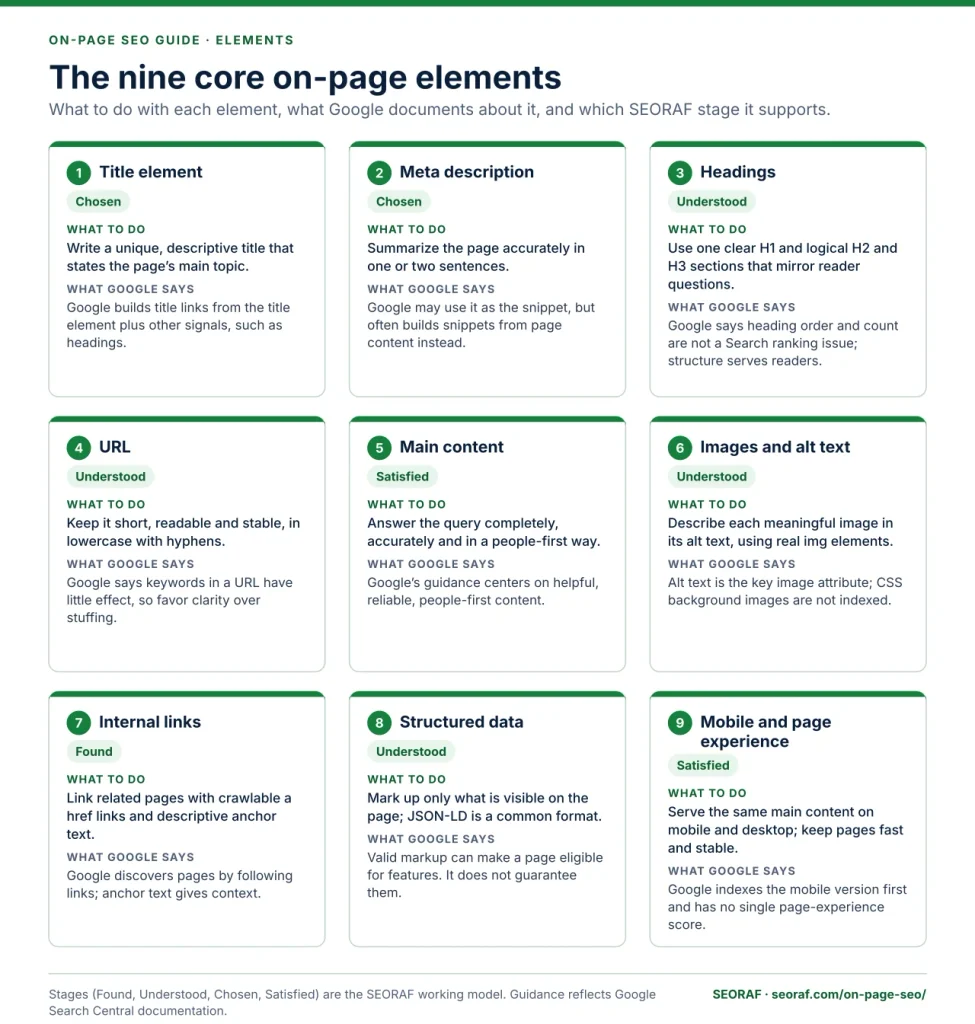
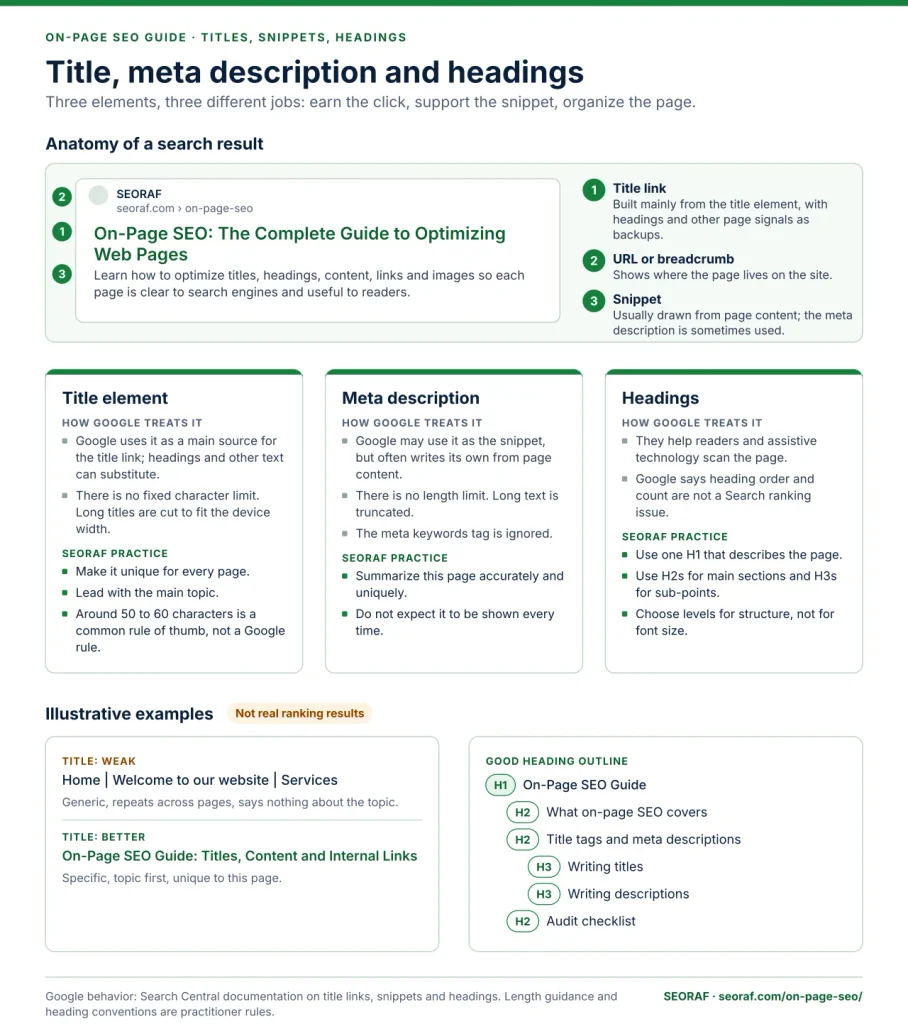
The title element is the <title> tag in your page’s head. The title link is the clickable headline Google actually shows in results. Google builds the title link from several sources, so your title tag is a strong suggestion, not a command.
How Google decides which title to show
According to Google’s documentation on title links, the sources include the content of the <title> element, the main visual title shown on the page, heading elements such as <h1>, og:title meta tags, other large and prominent text styled as a headline, other text on the page, anchor text on the page, text in links that point to the page, and WebSite structured data. If you change a title, Google must recrawl and reprocess the page to notice, which can take from a few days to a few weeks.
Title tag writing principles
Google-documented practices:
- Give every page a title element.
- Make it descriptive and concise. Avoid vague titles like “Home” or “Profile.”
- Avoid keyword stuffing and repeated or boilerplate text.
- Brand concisely, with the site name at the start or end, separated by a hyphen, colon or pipe.
- Make it clear which text is the page’s main title. Google’s example is putting it in the first visible
<h1>. - Write the title in the same language and script as the page.
Google’s people-first content guidance also asks whether the title summarizes the content clearly and avoids exaggeration or shock value.
Practitioner observation: length. You’ll often see “keep titles under 60 characters.” Google sets no length limit and truncates the title link to fit the device width. The 50 to 60 character guideline is a reasonable rule of thumb for avoiding truncation on most screens, not a rule Google enforces.
Primary keyword placement and descriptive titles
- Front-load the distinguishing words, so if truncation happens it cuts the least important part. Place the primary keyword early when it reads naturally, and not at all if it doesn’t.
- Read the title alone. Would a stranger know what the page offers?
- Promise only what the page delivers. A misleading title can win a click and lose the visitor.
- Keep every title unique. Duplicate or near-duplicate titles make pages look interchangeable in results.
| Problem | Weak title | Stronger title |
|---|---|---|
| Vague | Home | Brewline: Pour-Over Coffee Guides and Gear |
| Keyword-stuffed | Pour Over Coffee, Pour Over Guide, Pour Over Tips | Pour-Over Coffee: A Beginner’s Step-by-Step Guide |
| Boilerplate | Brewline – Coffee Articles | How to Descale a Gooseneck Kettle | Brewline |
| Obsolete | Best Coffee Grinders 2023 | Best Coffee Grinders for Pour-Over | Brewline |
| Over-promising | The ONLY Pour-Over Guide You’ll Ever Need | The Complete Pour-Over Guide: Ratios, Grind, Technique |
Table 5. Title examples for a fictional site (illustrative; no product or site shown has been tested by SEORAF)
A note on years. Adding a year can signal freshness, but if you don’t update it, Google may treat the title as obsolete. If you add one, commit to maintaining it.
Why Google rewrites titles
Seeing a different title in search than the one you wrote is common, and it isn’t always a mistake. Google says that if it detects an issue with the title element or main heading, it may generate a better title link from other sources. These are the issues it describes, with fixes:
| Issue Google describes | What it looks like | Fix |
|---|---|---|
| Half-empty title | | Site Name with the page part missing | Complete the title with the page topic |
| Obsolete title | An old year left on a recurring page | Update the title or remove the year |
| Inaccurate title | Dynamic content that no longer matches the title | Make the title reflect what’s on the page |
| Micro-boilerplate | Many pages share nearly identical titles | Add what differs: season, version, location |
| No clear main title | Several equally prominent headings | Make one heading clearly dominant, usually the first visible <h1> |
| Language or script mismatch | English title on a Hindi page | Match the page’s language and script |
| Site name duplication | Brand repeated when Google already shows it | Shorten or drop the repeated brand |
Table 6. Title rewrite diagnostic (basis: Google-documented issues, SEORAF fixes)
Google also suggests asking whether the title link it shows might fit the query better than yours. Sometimes it does. Keeping the title, the H1 and any og:title aligned is the simplest way to reduce rewrites. To check your own titles quickly, try SEORAF’s Title & Meta Analyzer.
Meta Description Optimization
The meta description is a short summary of the page written in the <head>. Visitors don’t see it on the page, but it can appear under your title in search results.
Purpose of meta descriptions
Google’s snippet documentation is specific. Snippets are mostly built from the page’s own content, and Google may show different snippets for different searches. Google sometimes uses the meta description if it describes the page better than the on-page content. There is no limit on meta description length, but the snippet is truncated to fit the device width. A meta description is therefore a candidate for the snippet, not a guarantee. It belongs to the Chosen stage: it helps decide the click.
Writing useful descriptions
Google-documented:
- Create a unique description for each page. Identical descriptions across a site aren’t helpful.
- Include relevant information about the content. It doesn’t have to be a sentence. For an article it could carry the author or publication date. For a product page, details such as price or manufacturer.
- Avoid a list of keywords. Google notes these don’t tell users what the page is about.
- For large database-driven sites, programmatic descriptions are acceptable if they are human-readable and diverse.
SEORAF recommendations:
- Lead with what the page gives the reader, not with the brand name.
- Match the page’s search intent. A guide’s description should promise an explanation, and a product page’s should include the details buyers check.
- Use natural keyword wording only where it fits the summary.
- Aim for one or two sentences. Around 150 to 160 characters is a common practitioner guideline, but Google applies no fixed limit.
| Problem | Weak | Stronger |
|---|---|---|
| Keyword list | pour over coffee, pour over guide, pour over kettle, coffee tips | Learn the pour-over method step by step: ratios, grind size, water temperature and pouring technique for a clean, balanced cup. |
| Doesn’t summarize | Coffee has been part of my mornings for years, and I love it. | A practical guide to descaling a gooseneck kettle at home, with a simple method and how often to repeat it. |
| Too thin | Pour-over guide | A beginner's guide to pour-over coffee with a ratio chart and common mistakes to avoid. |
Table 7. Meta description examples for a fictional site (illustrative)
Why Google may generate different snippets
Because snippets come mostly from page content, Google may replace your description with text that better matches the query. Make sure your opening copy states clearly what the page covers. Site owners also have snippet controls: nosnippet prevents a snippet, max-snippet sets a maximum length, and data-nosnippet excludes part of a page. Google’s generative AI guidance says a page must be eligible to be shown in Search with a snippet to appear in AI features, so only restrict snippets when you mean to.
Most CMS platforms and SEO plugins, including Rank Math, provide a field for the meta description. Google advises avoiding JavaScript to inject or change meta tags where possible and testing carefully if you must. The meta keywords tag is ignored by Google Search, so don’t spend time on it.
Quick check before publishing: is it unique, does it summarize this page, does it match the intent, is the important part at the front, and is it free of keyword lists?
Heading Structure Optimization
Headings do two jobs: they help readers move through the page, and they help clarify what each part is about. Google also treats page titles and headings as part of a page’s main content, since they summarize the topic and help users decide whether to read on. Heading tag optimization is mostly about clarity.
H1, H2 and H3: what Google does and doesn’t require
Heading advice is where convention and documentation diverge most. Google’s SEO Starter Guide says that headings in semantic order are great for screen readers, but from a Google Search perspective it doesn’t matter if they are used out of order. It also says there is no ideal number of headings, though if you think a page has too many, it probably does.
So “use only one H1” is a practitioner observation, not a Google rule. SEORAF still recommends a single H1. That is not because Google penalizes more, but because it keeps the page’s main title unambiguous, which Google’s title-link guidance explicitly values, and it avoids accidental duplicates from theme templates. In WordPress the post title usually becomes the H1, so the headings you write in the editor start at H2.
Building a logical hierarchy
- Write H2s as the questions or jobs the page covers, in the order a reader would need them.
- Use H3s for sub-decisions, steps or comparisons within an H2.
- Give every heading a distinct job. If two headings could swap places without anyone noticing, merge them.
- Read only the headings. They should tell the whole story of the page.
- Use the primary keyword naturally in the H1 and where a subheading truly benefits, not in every heading.
H1: Pour-Over Coffee: A Beginner's Step-by-Step Guide
  H2: What pour-over coffee is
  H2: Equipment you need (and what you can skip)
    H3: Kettle
    H3: Dripper and filters
  H2: The method, step by step
    H3: Ratio and water temperature
    H3: Rinse, bloom, pour
  H2: Common mistakes and how to fix them
Illustrative outline for a fictional pour-over guide.
Descriptive headings and accessibility
Make a heading with a heading element, not by bolding a line of text. Heading elements give assistive technology a navigable structure, and the W3C’s accessibility tutorials describe headings as a way to convey a page’s structure. Prefer descriptive headings (“How to descale a gooseneck kettle”) over vague ones (“Next steps”).
Common heading mistakes
- Several equally prominent headings competing as the main title.
- Headings written only as keyword variations with no real content difference.
- Skipping heading structure entirely on long pages.
- Using headings purely for visual size, regardless of meaning.
- Hiding key answers inside tabs or collapsed sections. Google can show a “Read more” deep link in a snippet only when the content is immediately visible to a human.
URL Structure Optimization
Headings organize the page. The next layer is the address that identifies it. A URL tells a visitor roughly where they are, gives Google a stable identifier for the page, and often appears in results as a breadcrumb-style path. That makes it worth getting right once and rarely worth changing afterward.
What Google documents about URLs
Google’s URL structure guidance is mostly about clarity and crawl efficiency, not ranking:
- Use meaningful words instead of long ID numbers, in your audience’s language.
- Use hyphens, not underscores, to separate words.
- URLs are case-sensitive for Google, so
/APPLEand/applecount as different URLs. Pick one convention, usually lowercase, and keep it. - Don’t use URL fragments (
#) to change what a page shows. - Avoid unnecessary parameters and session IDs, which can create huge numbers of near-duplicate URLs.
The SEO Starter Guide adds a useful correction: keywords in the URL path have hardly any effect on ranking beyond appearing in breadcrumbs. Treat the URL as a clarity tool for people, not a ranking lever.
Descriptive, readable and consistent URLs
These are SEORAF recommendations built on the documented behavior:
- Keep it as short as it can be while staying descriptive. If you can’t tell the topic from the slug, it’s too vague.
- Describe the page, not a keyword list. One clear phrase beats three variations.
- Leave dates out unless the date is part of the content. A date in the slug locks you into a stale-looking address when you update the page. This is a practitioner observation.
- Use folders that mean something, and keep the pattern consistent across the site.
- Link internally to the clean URL, not to versions with tracking parameters.
| Problem | Weaker | Stronger | Why |
|---|---|---|---|
| Opaque ID | /p?id=4829 | /pour-over-coffee-guide/ | Words describe the page |
| Keyword-repeating | /pour-over-coffee-pour-over-guide-best-pour-over-tips/ | /pour-over-coffee-guide/ | Shorter, clearer |
| Dated | /2026/11/pour-over-coffee-guide/ | /pour-over-coffee-guide/ | Survives updates |
| Underscores | /pour_over_guide/ | /pour-over-guide/ | Hyphens separate words |
| Mixed case | /Pour-Over-Guide/ | /pour-over-guide/ | One case avoids duplicates |
| Parameter clutter | /guide?utm_source=newsletter&ref=7 | /guide/ | Fewer duplicate URLs |
Table 8. URL examples for a fictional site (illustrative)
Avoiding unnecessary URL changes and handling redirects
Change a URL only when the old one is genuinely wrong, not to squeeze in a keyword. If you must change one:
- Set up a permanent (301) redirect from the old URL to the new one. Google treats redirects as a strong signal about which URL should be canonical.
- Update internal links, the canonical tag and the sitemap to the new address.
- Check the new URL in Search Console’s URL Inspection tool.
If two URLs show the same content and you can’t redirect, use a rel="canonical" link element. Google’s documentation on duplicate URLs explains the options. Duplicate content is not a spam violation, but it wastes crawling effort and confuses users.
Content Quality and Relevance
Titles, headings and tags help a page get chosen. They can’t make a weak page worth choosing. Google says that creating content people find compelling and useful will likely influence your presence in search more than any other suggestion in its starter guide. This is the core of SEO content optimization.
Main content comes first
In its helpful content guidance, Google defines main content as any part of the page that directly helps it achieve its purpose. Depending on the page, that can include the primary text and media, interactive features such as calculators, user contributions that serve the page’s purpose, content inside tabs or expandable sections, and the page’s title and headings.
SEORAF recommends the First-Screen Test: open the page on a phone and look only at the first screen. Does it deliver the page’s promise, or at least show the reader that the answer is coming? If the first screen is a long preamble, an ad or a pop-up, the main content is buried.
Helpful, people-first content
Google contrasts people-first content with content made mainly to attract search visits. Several of its warning signs concern on-page decisions:
- Writing to hit a particular word count because you heard Google prefers one. Google says it doesn’t.
- Summarizing what others say without adding anything useful.
- Producing lots of content on many topics hoping some will rank.
- Leaving readers feeling they need to search again for a better answer.
- Changing page dates to look fresh when little has changed.
The reverse is a useful self-check. After reading your page, would someone feel they learned enough to reach their goal?
Information gain: effort, originality, skill and accuracy
Google’s guidance lists four attributes that quality raters assess in main content. Raters help Google test its systems and don’t control rankings, but the attributes show what the systems are designed to reward. “Information gain” is a practitioner term for the second one: what your page adds that other pages don’t.
| Attribute | What Google describes | Typical action |
|---|---|---|
| Effort | How much human work went into the content. Original analysis shows effort. Mass-generated pages with little oversight show little. | Add original analysis, testing or custom visuals |
| Originality | Information or perspectives not already available on other sites | Add your own data, experience or framework |
| Talent or skill | Skill needed for a satisfying experience: clear writing, well-produced media, working tools | Edit hard; test tools and tables |
| Accuracy | Information should be factually correct. Topics affecting health, finances or safety need extra care. | Verify, cite sources, date time-sensitive facts |
Table 9. Main-content attributes as page-level actions (basis: Google-documented, actions are SEORAF recommendations)
Topic coverage, organization and avoiding thin content
Google sets no ideal length. A page is long enough when it covers what the searcher’s intent requires, and no longer. To get there, list the sub-questions from the SERP Intent Check, make sure each has a clear answer, and cut any paragraph that doesn’t change what a reader would understand or decide. For structure, SEORAF suggests an Answer, Evidence, Next step pattern: a first screen with the answer, sections that each support a claim with an example or source, and a closing link or action that fits what the reader needs next. Thin and repetitive pages are the opposite: many near-identical pages, or pages that restate other sites without adding anything.
Demonstrating experience honestly
Google’s guidance asks Who, How and Why questions about a page, and each translates into something visible. Show who wrote it with a real byline and an author page, such as SEORAF’s author page. Show how it was made, including AI assistance where readers would expect to know, and for reviews say what was tested and show evidence. Show why it exists: to help the reader, not just to attract a visit. Google’s guidance on generative AI content says AI can help with research and structure, that generating many pages without adding value may violate its scaled content abuse policy, and that accuracy matters. Invented names, fake credentials and AI-generated headshots are deception. Only claim experience you actually have.
Semantic SEO and Entity Coverage
Semantic SEO means writing so a page covers the concepts, relationships and questions that define its topic, instead of repeating one phrase. It is a content habit rather than a tag, and it is the opposite of keyword stuffing.
What Google documents
Google says its language systems understand synonyms and general meaning, so you don’t need to capture every variation of how someone might search. In its generative AI guidance, it adds that creating separate pages for every variation or related query, primarily to manipulate rankings, can violate the scaled content abuse policy. The goal is not more pages or more keyword variants. It is one page that covers its topic completely.
Related concepts, entities and contextual relevance
“Entities” (the distinct things, people, places and ideas a topic involves) and “topical authority” are practitioner terms. Google does not document them as ranking mechanisms, and no special formula exists. In practice, covering entities means:
- List the core concepts a reader must understand to master the topic.
- Map relationships: what depends on what, what is part of what, what is compared with what.
- Map questions by level: beginner, intermediate, advanced.
- Decide placement: a section on this page, or a separate page with its own intent.
- Check against reality: the live results and your Search Console queries.
| Concept | Relationship | Where it lives |
|---|---|---|
| Pour-over method | The core topic | The main guide |
| Dripper, filter, gooseneck kettle | Equipment the method needs | A section, with comparisons in a separate buyer’s guide |
| Grind size, ratio, water temperature | Variables that change the result | Method section |
| Extraction | The idea behind common mistakes | Troubleshooting section |
| Pour-over vs French press | A comparison with different intent | Separate page |
Table 10. A concept map for a fictional pour-over page (illustrative)
Three habits make this work: define a term where it first appears, keep terminology consistent, and use examples and comparisons to connect ideas. For a deeper treatment see SEORAF’s semantic SEO guide.
Keyword Placement in Content
The keyword mapping section covered the principles: place keywords where they read naturally and avoid stuffing. This section is a reference for where each type of term can go, so you can run one placement pass after drafting.
| Zone | Primary keyword | Variations and related terms | Avoid |
|---|---|---|---|
| Title | Yes, naturally | Rarely | Lists of variations |
| Main heading (H1) | Yes, as the page’s topic | No | Duplicating the title word for word for no reason |
| Introduction | If it fits | A supporting term | Forced repetition |
| Relevant subheadings | Only where the subtopic needs it | Often the right place for variants | The keyword in every heading |
| Body content | A few natural mentions | Synonyms and related terms | Repeating the exact phrase for its own sake |
| Image alt text | Where it describes the image | Descriptive terms | Keyword lists |
Table 11. Natural keyword placement by page zone (basis: SEORAF recommendation)
Draft first, with the reader in mind. Then check each zone, and read the page aloud once more. If a sentence sounds like it was written for a machine, rewrite it. Google defines keyword stuffing as filling a page with keywords or numbers to manipulate rankings, and it violates Google’s spam policies. The old keywords meta tag is not used by Google Search.
Practitioner observation: you’ll see advice such as “use the keyword in the first 100 words” or “aim for a 2% density.” Google documents no target number or position. If the keyword fits naturally early on, fine. If it doesn’t, don’t force it. “LSI keywords” is a tool-marketing label for related terms, not a documented Google mechanism.
Illustrative contrast. Stuffed: “Pour-over coffee is the best pour-over coffee. Our pour-over coffee guide shows pour-over coffee beginners how to make pour-over coffee at home.” Natural: “Pour-over is a manual brewing method where hot water drips through ground coffee in a filter. This guide walks you through each step, from grinding to the final pour.”
Internal Linking Optimization
Internal links connect your pages. They help Google find them and help readers continue. Google notes that the vast majority of new pages it discovers come through links, so a page with no internal links pointing to it, an orphan page, may be hard to find at all.
What makes a link work
According to Google’s link guidance:
- Google generally crawls links only when they are
<a>elements with anhrefattribute. Links created purely by script events may not be parsed. - Anchor text should be descriptive, reasonably concise and relevant to both pages.
- Don’t chain links one after another. Readers lose the context around each link.
- For an image used as a link, Google uses the image’s alt text as the anchor.
- If a script inserts anchor text, check that it appears in the rendered HTML using the URL Inspection tool.
Internal link structure, contextual links and anchor text
- No orphans. Every page you want found has at least one link from a hub or related page.
- Hub to spoke and back. Each pillar links to its supporting pages, and each supporting page links back once.
- Match anchor to destination. “How to write title tags” is more helpful than “click here” or “read more.”
- Vary naturally. Don’t use the same exact-match phrase for every link to one page.
- Link where intent matches, in body copy, where the reader would reasonably wonder about that topic.
Google says links help discovery and context and that PageRank is only one of many signals, so don’t promise ranking effects from linking alone.
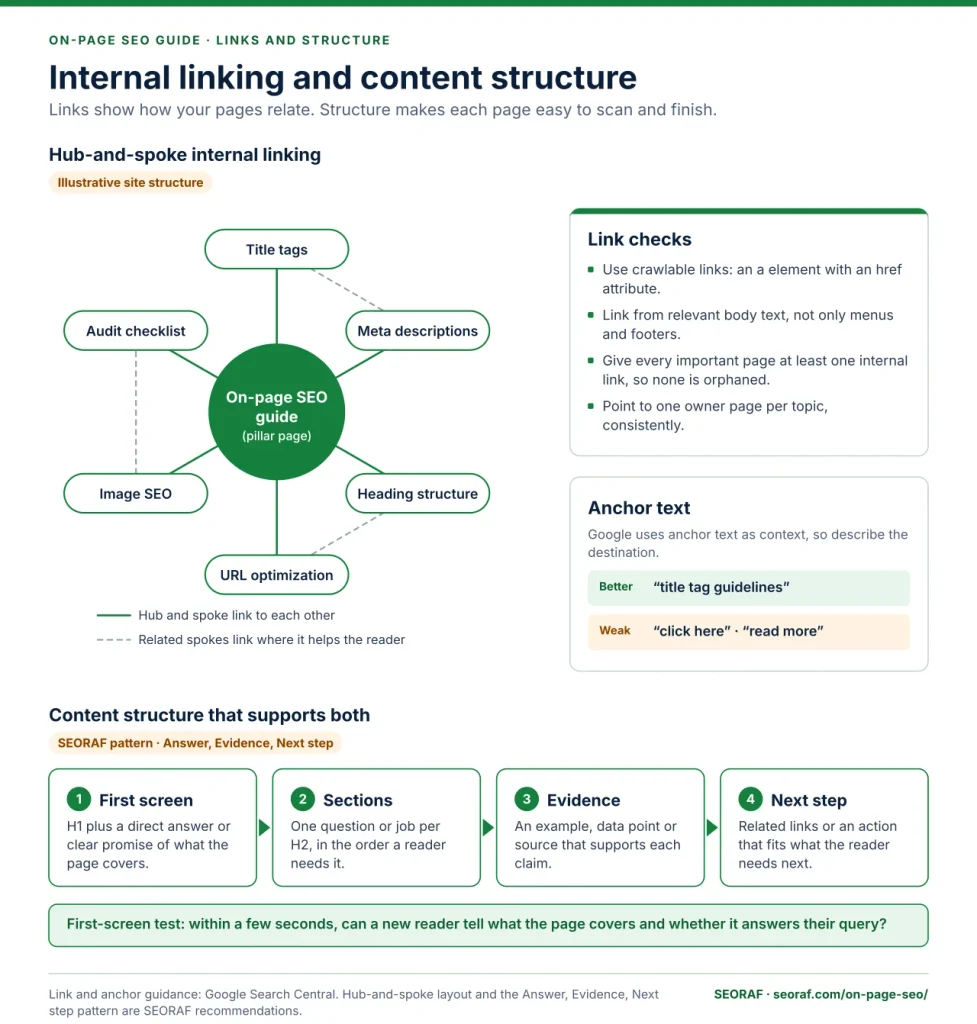
To find opportunities, search your own site for a topic (for example site:yourdomain.com "title tag") and add links where a mention has no link. Common mistakes include auto-filled “related posts” modules full of irrelevant items, identical exact-match anchors everywhere, and linking to a duplicate or redirected URL instead of the clean one.
External Linking
Linking out is part of being a good source. Google’s Starter Guide says links can add value by connecting readers to a resource that corroborates what you write. It does not document a ranking bonus for linking to large sites, so treat that popular claim as unverified.
- Link to reliable sources: the original source of a fact or the official documentation behind a recommendation.
- Keep links contextual: point to a resource that helps readers go deeper than your page does.
- Attribute sources: support a claim you would otherwise ask readers to take on trust, and check that the linked page still says what you cited.
- Avoid unnecessary external links that only send readers away without helping them.
Google lets you describe your relationship to a linked page through the rel attribute, as set out in its outbound links guidance:
| Value | Use for | Notes |
|---|---|---|
| (none) | Ordinary editorial links you trust | No attribute needed |
sponsored | Advertisements and paid placements | Google’s documented value for paid links |
ugc | Links in comments, forum posts and other user-generated content | Can be left off for consistently trustworthy contributors |
nofollow | Links where other values don’t apply and you don’t want to be associated with the page | Can be combined with other values |
Table 12. Link attributes (basis: Google-documented)
Google adds that links marked this way will generally not be followed, though the linked pages may still be found through other routes. Google’s page says to mark advertisements and paid placements as sponsored. The cautious reading is that affiliate links belong in that category, so SEORAF recommends marking them sponsored and disclosing the relationship to readers. Check Google’s current guidance for the exact wording.
<a href="https://example.com/tool" rel="sponsored">Example tool</a>Image SEO Optimization
Images help readers, and they give Google more to understand. Google’s image best practices are specific.
What Google documents
- Alt text is the most important attribute for describing an image. Google uses it together with computer vision and the surrounding page content. It also serves people who use screen readers.
- Descriptive filenames give light clues.
- Place images near relevant text and on relevant pages. This is image context.
- Google finds images in the
srcattribute of<img>elements, including inside<picture>. It doesn’t index CSS images. - Supported formats include JPEG, PNG, GIF, BMP, WebP, SVG and AVIF.
- Keyword-stuffed alt text is unfriendly to users and risks looking spammy.
Alt text and accessibility
Describe what the image shows and why it matters on that page, as briefly as is still useful. For images that are only decoration, an empty alt="" tells assistive technology to skip them, which is an accessibility convention described in the W3C’s image tutorials.
| Image | Weak alt text | Stronger alt text |
|---|---|---|
| Photo of a pour-over setup | image1.jpg or coffee | Glass dripper on a mug with a gooseneck kettle pouring |
| Chart | chart | Bar chart comparing brew times at three grind sizes |
| Image used as a link | arrow | Read the pour-over troubleshooting guide |
| Keyword-stuffed | pour over coffee best pour over guide | Describe the image instead |
Table 13. Alt text examples (illustrative)
Filenames, dimensions, responsive images, compression and formats
- Descriptive filenames: name files with hyphens before uploading, for example
glass-pour-over-dripper.webp. - Dimensions: set width and height so the layout doesn’t jump while loading. This is general web-performance practice (practitioner observation), documented on web.dev rather than in Search documentation.
- Responsive images: use
srcsetor<picture>so phones don’t download desktop-sized files. - Compression and modern formats: compress images, and consider WebP or AVIF, both of which Google supports.
- Lazy loading: lazy-load images below the first screen, but not the primary content that needs to be there on load.
- Don’t put essential information only inside an image. Put it in the text too.
- Infographics and SVG diagrams: add a short text description near them that conveys the key point, so the information is accessible and indexable.
SEORAF’s Image Alt Generator is one free tool for drafting descriptions. Always edit alt text to fit the page.
Structured Data and Schema Markup
Structured data is code that labels what a page contains, such as an article’s headline and dates or a page’s breadcrumb path. Google says it gives explicit clues about the meaning of a page. What it does not do is guarantee a rich result or a ranking boost.
What Google documents
From Google’s introduction to structured data:
- Search supports JSON-LD, Microdata and RDFa. Most guides use JSON-LD because it keeps markup separate from visible HTML.
- Most Search structured data uses schema.org vocabulary, but Google’s own documentation is definitive for how Search behaves.
- You must include all required properties for a type to be eligible for enhanced display.
- Don’t mark up information that isn’t visible to users, even if it’s accurate. Misleading markup can lead to a manual action.
- Validate with the Rich Results Test during development and monitor the rich result status reports afterward, since template changes can break markup.
Relevant schema types
| Markup | What it’s for | Status and notes |
|---|---|---|
| Article (including BlogPosting) | Headline, author, datePublished, dateModified, image | Google’s byline-date guidance recommends date fields that match the visible dates |
| BreadcrumbList | Breadcrumb path | Google learns breadcrumbs from URL words and lets you influence them with markup |
| Organization / WebSite | Who runs the site | Documented as supported; WebSite data is also a title-link source |
| Review, Product | Eligible pages only | Strict guidelines; use only when the page truly fits |
| FAQPage | Question-and-answer rich results | Restricted in 2023; industry reports describe further removal in 2026. Not independently verified: check Google’s documentation updates for the exact status |
| HowTo | Step-by-step rich results | Retired by Google in 2023 |
Table 14. Common markup and its status (basis: Google-documented unless marked)
Eligibility versus guaranteed rich results. Valid markup makes a page eligible. Google decides whether to show an enhancement. Structured data is also not required for AI features, and there is no special markup for them. Keep it for rich-result eligibility and clarity, not as an AI tactic.
Implementation. On SEORAF, Article and breadcrumb markup is handled by the Rank Math plugin rather than written by hand. Whichever tool you use, check its output with the Rich Results Test, make sure the visible author and dates match the markup, and never add markup for content that isn’t on the page.
Mobile-Friendly Content and Page Experience
Google primarily uses the mobile version of a page for indexing and ranking, a practice called mobile-first indexing. It is about how Google gathers content, not a separate ranking system, but it means anything missing from the mobile version may not be seen.
Responsive design, readability and navigation
- Use a responsive layout that serves the same main content on mobile and desktop. Content shown only on desktop may not be used for indexing.
- Don’t lazy-load primary content only after a user interaction.
- Keep robots meta tags, structured data and image practices consistent between versions.
- Make text readable without zooming, tables usable (stacked or scrollable), and tap targets comfortable.
- Keep navigation simple, and keep key answers visible instead of hidden behind interaction.
- Make infographics and images scale with the screen instead of using fixed widths.
Core Web Vitals and interaction usability
Google’s page experience guidance is carefully worded.
- Google-documented: there is no single page experience signal for ranking. Its core systems look at signals aligned with overall page experience, so don’t focus on only one or two aspects.
- Google-documented: Google recommends good Core Web Vitals. They measure loading (Largest Contentful Paint, good at 2.5 seconds or less), interactivity (Interaction to Next Paint, good at 200 milliseconds or less) and visual stability (Cumulative Layout Shift, good at 0.1 or less).
- Google-documented: good scores in a report don’t guarantee top rankings. Relevance still comes first.
- SEORAF recommendation: fix the page-level items first, since they are yours to control, and hand deeper performance work to a developer.
| Aspect | On-page action | Who can do it |
|---|---|---|
| Loading | Compress images; avoid heavy embeds | Content team |
| Visual stability | Set image and embed dimensions; avoid late-loading banners that push text | Content team and theme |
| Interactivity | Limit heavy third-party scripts | Developer or plugin settings |
| Readability | Clear structure, readable text | Content team |
| Security | Serve pages over HTTPS | Hosting |
Table 15. Page experience and what you can change (basis: SEORAF recommendation)
Avoiding intrusive interruptions
Full-screen overlays, pop-ups that cover the content on arrival and banners that block reading make a page harder to use, and Google’s page experience resources point to avoiding intrusive interstitials. Cookie and consent notices are legitimate, so keep them compact and don’t let them cover the main content.
Content Freshness and Updating
Fresh content means accurate and current, not newly dated. Google’s guidance is firm on this.
When content should be updated
- Check older content and update it or delete it if it’s no longer relevant.
- Update when a fact, price, step or screenshot has changed, when the search intent has shifted, or when a section the intent needs is missing.
- Pick candidates from Search Console: pages with declining or stale performance.
Accuracy checks, meaningful updates and artificial date changes
Don’t change dates on pages to make them look current when the content hasn’t changed significantly, and don’t add or remove large amounts of content just to seem fresher. Google says that doesn’t work. Google’s byline date guidance says its systems consider several factors to estimate when a page was published or significantly updated, and recommends the following:
- Show a visible date labeled “Published” or “Last updated.”
- Add
datePublishedanddateModifiedin Article markup, consistent with the visible dates. - Don’t use future dates, and minimize other dates on the page.
- Google doesn’t guarantee that a byline date will appear.
| Update type | Substantive? | Change the date? |
|---|---|---|
| Fixing a typo | No | No |
| Reordering a few paragraphs | No | No |
| Updating a changed fact, price or step | Yes | Yes |
| Adding a missing section the intent needs | Yes | Yes |
| Swapping the year in the title only | No | No |
Table 16. Cosmetic versus substantive updates (basis: SEORAF recommendation based on Google’s date guidance)
Best On-Page SEO Tools
Tools save time. They don’t replace judgment. Google’s guidance on third-party SEO tools and advice makes three points worth remembering: third-party tools don’t have access to Google’s internal ranking data, they can’t guarantee performance, and Google doesn’t evaluate or endorse them. A tool’s “content score” is that tool’s heuristic, not a Google metric. This section describes categories only. SEORAF makes no testing, pricing or performance claims about any product named here.
| Tool | What it is for | Notes |
|---|---|---|
| Google Search Console | Indexing status, queries, clicks, impressions, URL Inspection | Google’s first-party source for search performance |
| Google Analytics | What visitors do on your site after they arrive | Google’s first-party source for on-site behavior |
| Google Rich Results Test | Checking whether structured data is valid and eligible | Use during development and after template changes |
| PageSpeed Insights | Lab and field performance data and Core Web Vitals | Lab and field views can differ |
| Screaming Frog SEO Spider | Desktop crawler that lists titles, meta descriptions, headings, status codes and canonicals across many URLs | Useful for finding missing or duplicate elements at scale |
| Rank Math | WordPress SEO plugin with fields for title, meta description, canonical, robots and schema settings | The plugin used on SEORAF; its previews are guides, not Google’s output |
| SEORAF free tools | Title & Meta Analyzer, Image Alt Generator, Content Outline Generator, Keyword Intent Tool, SEO Audit Tool | Quick checks; verify results against Google’s guidance |
Table 17. A practical stack by job (basis: SEORAF recommendation)
Buy a paid tool when a task is repeated often, spans many pages or needs scale, and verify current features and pricing on the vendor’s site. For wider comparisons, see SEORAF’s best SEO tools coverage.
How to Perform an On-Page SEO Audit
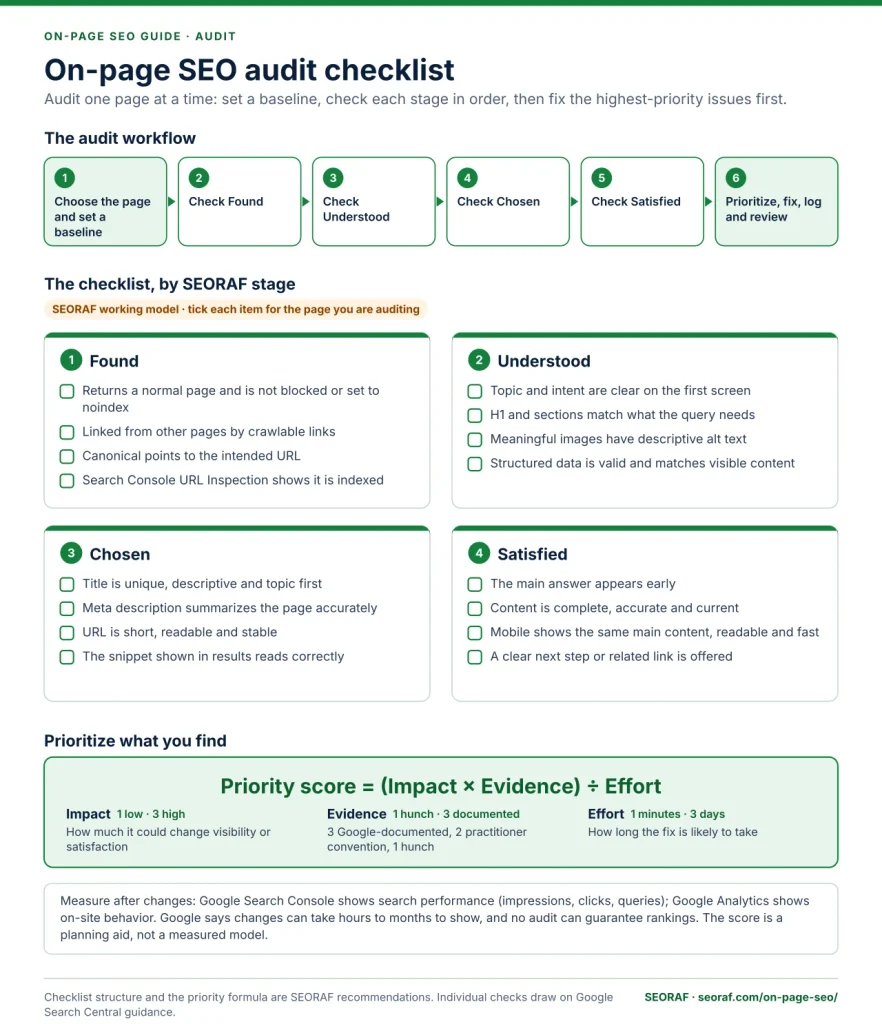
Use this workflow to audit one page. It follows the four stages from the beginning of this guide, so the order of the checks matches the order of the problems.
- Choose the page and set a baseline. Pick it by purpose, such as an important page or one with slipping traffic. Define its search intent in one sentence. Record clicks, impressions, CTR and position from Search Console, and engaged sessions and conversions from Google Analytics, over a comparable period.
- Check Found (indexability and links). Use URL Inspection: is the page indexed, is the canonical correct, does the rendered page show the main content, is anything blocked or set to
noindex, and do other pages link to it with crawlable links? - Check Understood (intent, headings, content, images, markup). Run the SERP Intent Check and compare the page to your keyword map for overlap. Review the heading hierarchy and topic clarity, content relevance, alt text and any structured data.
- Check Chosen (title and meta). Review the title and meta description. Compare the title Google shows with yours. Look at queries with high impressions and low clicks.
- Check Satisfied (first screen, mobile and performance). Apply the First-Screen Test. Check originality, accuracy, mobile display and Core Web Vitals.
- Prioritize, implement and log. Score each issue with the formula below, make the changes, and record each with the date.
Review after a few weeks, since Google says changes can take hours to months.
Symptom diagnostic
| Symptom | Likely stage | First checks | Typical fixes |
|---|---|---|---|
| Not in the index | Found | URL Inspection, robots and noindex rules, internal links | Fix access, add internal links |
| Indexed but almost no impressions | Understood | Intent match, keyword overlap | Re-scope the page, resolve cannibalization |
| Impressions but few clicks | Chosen | Title, snippet, Google’s rewritten title | Rewrite title and description |
| Ranks for the wrong queries | Understood | Page topic clarity, headings | Sharpen focus |
| Clicks but poor engagement | Satisfied | First screen, content depth, mobile | Improve main content and layout |
| Two pages swap rankings | Understood | Search Console queries by URL | Merge or differentiate |
Table 18. Symptom diagnostic (basis: SEORAF recommendation)
How to prioritize corrections
A long list of issues is demoralizing, so score each one: Priority = (Impact × Evidence) ÷ Effort, each scored 1 to 3. Impact is how much it could change visibility or satisfaction. Evidence is 3 for Google-documented, 2 for practitioner observation, 1 for a hunch. Effort is 1 for minutes and 3 for days. This is a planning aid, not a measured model.
| Fix | Impact | Evidence | Effort | Score |
|---|---|---|---|---|
| Replace a boilerplate title | 3 | 3 | 1 | 9 |
| Add internal links to an orphan page | 2 | 3 | 1 | 6 |
| Rewrite a thin section | 3 | 3 | 3 | 3 |
| Reorder headings for a style preference | 1 | 1 | 2 | 0.5 |
Table 19. Scoring example (illustrative)
To measure results, remember that Search Console is Google’s source for search performance and Analytics for on-site behavior. Compare like-for-like periods, change one major thing at a time, keep a change log, and be patient. For a free starting point, try SEORAF’s SEO Audit Tool or its advanced SEO audit checklist.
Common On-Page SEO Mistakes
Myths are mistaken beliefs. Mistakes are habits. These are the habits that most often undermine otherwise good pages, with the likely consequence of each.
| Mistake | Likely consequence | Fix |
|---|---|---|
| Targeting the wrong intent | The page can’t satisfy the query | Run the SERP Intent Check first |
| Two pages chasing one keyword | They compete with each other | Keep a keyword map with one owner per keyword |
| Burying the answer | Readers leave before finding it | Apply the First-Screen Test |
| Boilerplate titles and descriptions | Pages look the same in results | Make each unique |
| Forcing keywords | Reads badly and risks breaching spam policies | Do a natural-language pass |
| Orphan pages | Hard for Google and readers to find | Add hub and sibling links |
| Marking up content that isn’t visible | Ineligible and potentially misleading | Match the visible text |
| Relying on JavaScript to insert titles or meta | Google may not process them as expected | Test in URL Inspection; prefer server-rendered tags |
| Changing dates without changing content | A documented warning sign | Update substantively |
| Publishing unreviewed AI drafts | Inaccuracy and low effort | Edit and fact-check |
| Moving pages without redirects | Lost links and confused crawlers | Use 301 redirects |
| Ignoring mobile | Mobile content is what gets indexed | Check the mobile version |
Table 20. Common mistakes and fixes (basis: SEORAF recommendation, grounded in Google documentation)
Advanced On-Page SEO Strategies
These help once the basics are in place. Each applies when a specific situation arises.
- Content architecture. Plan hubs and supporting pages so each topic has one owner page and clear links between related pages. Matters when: a site has many overlapping pages.
- Topic relationships and content gap analysis. Compare your page’s coverage with the sub-questions in the SERP Intent Check and fill the gaps that matter to the reader, not every gap a tool shows.
- Search intent refinement. In Search Console, filter by page and review the queries it appears for. When a page ranks for queries it isn’t built to answer, decide whether to optimize it, split the topic, or leave it.
- Page-level relevance and cannibalization consolidation. When two pages serve the same intent, merge the weaker into the stronger, redirect with a 301 and update internal links.
- Internal link optimization. Link from pages that already earn attention to those that need it, with anchors that match the destination’s intent.
- Content maintenance. Review older pages on a schedule, update what has changed and remove or consolidate what no longer helps. Google says to update or delete content that isn’t useful anymore, which is different from mass-deleting pages to seem fresh.
- Disciplined testing. Change one element, record the date, wait several weeks and compare similar periods. Don’t claim uplift without like-for-like data.
- Rendered-HTML checks. Use URL Inspection to confirm titles, meta tags, headings and links in the rendered page, especially on JavaScript-heavy sites.
- Template-level fixes. If every page has the same issue, fix it once in the template.
Complete On-Page SEO Checklist
Use this as a quick reference. Each item is explained earlier in the guide, and SEORAF’s advanced SEO audit checklist goes further.
Content
- ☐ The page’s job matches the search intent shown in the results.
- ☐ The first screen delivers the page’s promise.
- ☐ The page adds something original and claims are accurate and sourced.
- ☐ There is a real byline and a note on how the page was made.
Keywords
- ☐ One primary keyword has one owner page.
- ☐ Keywords appear naturally; none are stuffed.
- ☐ Related concepts and questions are covered.
Titles and headings
- ☐ The title is unique, descriptive and honest.
- ☐ The H1 and title agree.
- ☐ Headings tell the page’s story and each has a distinct job.
- ☐ The meta description summarizes this page.
URLs
- ☐ The URL is short, descriptive and lowercase with hyphens.
- ☐ No unnecessary parameters or dates.
- ☐ Any changed URL has a 301 redirect.
Internal links
- ☐ At least one relevant link points to the page.
- ☐ Links use crawlable
<a href>elements with descriptive anchors. - ☐ The page links to related supporting pages.
Images
- ☐ Meaningful images have descriptive alt text and filenames.
- ☐ Images are compressed, sized and lazy-loaded below the first screen.
- ☐ Infographics have a short text equivalent nearby.
Structured data
- ☐ Markup, if used, matches visible content and validates in the Rich Results Test.
- ☐ Visible dates match
datePublishedanddateModified.
User experience
- ☐ Layout works on mobile with no intrusive overlays.
- ☐ Core Web Vitals are reviewed in PageSpeed Insights or Search Console.
- ☐ Affiliate or sponsored links are marked and disclosed.
Technical verification
- ☐ The page is indexed and the canonical is correct (URL Inspection).
- ☐ No unintended
noindex, blocking or snippet restrictions. - ☐ The mobile version has the same main content.
- ☐ After publishing: log the date and review Search Console and Analytics after a few weeks.
Frequently Asked Questions
What is on-page SEO in simple terms?
It is improving a single page, including its content, title, headings, links and media, so search engines can understand it and people choose it and find it helpful. It covers what you can change on the page itself.
Is on-page SEO still important with AI Overviews and AI Mode?
Yes. Google says its generative AI features are rooted in its core ranking and quality systems, and that optimizing for them is still SEO. Pages must be indexed and eligible to be shown with a snippet to appear.
How long does on-page SEO take to work?
Google says some changes take effect within hours and others take months, and suggests waiting a few weeks before judging. Not every change will have a visible effect.
What is the difference between on-page, off-page and technical SEO?
On-page is what is on the page. Off-page is signals from elsewhere, such as links from other sites. Technical is whether Google can access, render and index the site. See the comparison table earlier in this guide.
How many times should I use my keyword?
Google documents no number. Use it where it reads naturally, and avoid unnatural repetition, since keyword stuffing violates Google’s spam policies.
Why did Google change my title in search results?
Google builds titles from several sources and may adjust them when it detects an issue such as a boilerplate or obsolete title. Fix the underlying cause. Sometimes its version fits the query better.
Is there an ideal word count or meta description length?
No. Google documents no word-count target and no meta description length limit, though it truncates snippets to fit the screen. Write as much as the page needs.
Should every page have only one H1?
One H1 is a widely used convention that keeps the main title clear. Google says heading order and count don’t matter for Search, so it is not a ranking rule.
Do I need schema markup?
Not for ranking. It makes pages eligible for certain rich results and clarifies meaning, and it isn’t required for AI features. Only mark up what is visible on the page.
Do internal links really matter?
They help Google discover pages and understand context, and they help readers continue. Google says most new pages are found through links. Don’t expect links alone to change rankings.
Do I need llms.txt or special formatting for AI search?
Google’s generative AI guidance says no special files, chunking or markup are needed for its AI features. Focus on a helpful, indexable, snippet-eligible page.
How often should I update a page?
Update when something substantive changes, such as a fact, price, step or the search intent. Don’t change dates or swap the year in a title just to look fresh.
Can on-page SEO guarantee first-page rankings?
No. It removes avoidable obstacles and helps a page compete, but nobody, including Google, can promise a position.
Conclusion
On-page SEO is less a checklist than a sequence. A page must be found, understood, chosen and satisfying, and when it underperforms, the useful question is which of those four it is failing. That keeps your effort on the right fix instead of on whichever tag is easiest to edit.
Three habits carry most of the value. Decide the page’s job before you optimize it: check the search results, map the keyword and give each page one job and one owner. Trust documented behavior over folklore: where Google has been clear, follow it, and where only convention exists, treat it as a hint. Change one thing, log it, and wait: measure with Search Console and Analytics over a few weeks.
Start small. Pick one important page, run the audit workflow, make the highest-scoring fix and record it. For a free starting point, try SEORAF’s SEO Audit Tool.